For the most part I am a self taught web developer and, for the most part, this is OK, because I’m capable of learning what I need to, when I need to.
Just-in-time knowledge.
Today I’ve been showing my son how to write HTML and he asked me how I learned to type so fast and our conversation led us to https://www.typingclub.com
What an eye opener. In the very first minute of the very first tutorial I learned something new. Something fundamental to the use of every QWERTY keyboard in existence…
See those little tabs on the F & J keys…
They are for finger alignment, so you can feel your way back to the right location on the keyboard.
Boom. Mind blown.
Tell me I’m not the only one that didn’t know this?… anyone?
Throughout my career I’ve always loved my job. But recently I’ve struggled. I’ve been working on a lot of legacy projects, I’ve not been empowered to implement change and I’ve not been proud of the products I’ve been creating.
This bothers me. It bothers me because I care.
I need to reboot.
I need to reengage with the development community.
I need to deep dive into Azure and Firebase.
I need to build an Angular application. And a probably a React.js application too.
I need to break out the RaspberryPis and get them doing something. Anything.
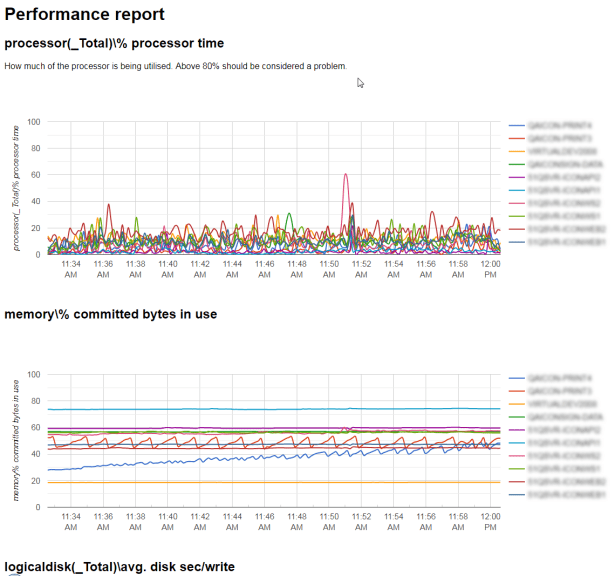
This script is used to convert the extracted CSV file into an HTML report.
clear
# define the first field in the file - this will be the x-axis for most graphs # and can also be eliminated from the report $timeField = "(PDH-CSV 4.0) (GMT Standard Time)(0)"
# add some start / end filters $startDate = Get-Date "2016-11-30 10:30:00" $endDate = Get-Date "2016-11-30 10:45:00"
$headers = @() $counterNames = @() $dataSet = @()
# Open the PerfMon CSV file $csv = Import-Csv $inFilePath\$testId.csv
# extract a list of the headers $headers = $csv | Get-Member -MemberType NoteProperty | select name $headers
# for each of the headers extract a unique list of the servers being monitored ForEach($header in ($headers | Where { $_ -notlike "*network*" })) { $counterName = ($header -split "\\\\")[2].Trim('}') if (-not $counterNames.Contains($counterName)){ $counterNames += $counterName $counterName } }
# date/values "[date, value]" for use on the Google Chart
# reuse the date strings if they haven't changed [datetime]$previousTime = Get-Date;
# the date must be a JavaScript date, so some manipulation will be required. $jsDate = ""
# loop through the CSV file and create a list of counters and $csv | Foreach-Object { foreach ($property in $_.PSObject.Properties) { $counterDate = [datetime]::ParseExact($_.$timeField, "MM/dd/yyyy HH:mm:ss.fff", $null)
# if the record is before or after the threshold, ignore the data if ($counterDate -lt $startDate -or $counterDate -gt $endDate){ "This row is out of the date range being processed." continue }
# if the time hasn't changed since the last time, we don't need to process this again if ($previousTime -ne $counterDate){ $jsDate = Get-Date $counterDate -format "yyyy,MM,dd,HH,mm,ss" $previousTime = $counterDate } That # if the value is empty, or property name is the same as the time field, don't include if (-not [String]::IsNullOrWhiteSpace($property.Value) -and $propertyName -ne $timeField) {
# build html $html = "<html>`n" $html += "<head>`n" $html += "<script type='text/javascript' src='https://www.gstatic.com/charts/loader.js'></script>`n" $html += " <script type='text/javascript'> // Load the Visualization API and the corechart package. google.charts.load('current', {'packages':['corechart']}); </script>`n"
$html += "</head>`n" $html += "<body>`n"
$html += "<h1>Performance report</h1>`n"
ForEach($counterName in $counterNames){
if ($counterName.Length -gt 0){ $html += "<h2>{0}</h2>`n" -f $counterName
# tidy up the name, so it can be used as a unique JS reference $jsCounterName = $counterName.Replace(" ","").Replace("/","").Replace("\","").Replace("#","").Replace(":","").Replace("(","").Replace(")","").Replace("%","").Replace("[","").Replace("]","").Replace(".","").Replace("-","").Replace("_","").Replace("{","").Replace("}","") $jsCounterName
# loop through each header to find the like-for-like counters ForEach($header in $headers | Where { $_.Name -like "*$counterName*"}) {
# if there aren't any records, don't output it if (($dataSet | Where { $_.Name -eq $header.Name } | Measure ) -eq 0){ continue }
$chartData = [string]::Join(",",($dataSet | Where { $_.Name -eq $header.Name } | Select -ExpandProperty Value )) }
$html += "<script type='text/javascript'> // Set a callback to run when the Google Visualization API is loaded. google.charts.setOnLoadCallback(drawChart" + $jsCounterName + ");
function drawChart" + $jsCounterName + "() { // Create the data table. var data = new google.visualization.DataTable(); data.addColumn('date', 'Time');
A recent problem I had was to bind the SelectedItem from a master datagrid, to the ItemsSource of a child datagrid. My work around’s using mouse clicks had too many limitations when used with MVVM – delete the selected item from the parent collection, the child collection did not update. Whilst watching John Papas PDC video for building large scale Silverlight application I spotted his sweet DataGridRowSelected command behaviours (documented http://thoughtjelly.blogspot.com/2009/12/silverlight-commands-data-grid-row.html)
public MainPage() { InitializeComponent(); this.LayoutRoot.DataContext = viewModel; }
}
and ViewModel:
public class ViewModel: ObjectBase { ObservableCollection _rainbowPeeps; ObservableCollection _theSimpsons; ObservableCollection _familyGuyKids;
public ViewModel() { /// setting up some dummy data _rainbowPeeps = new ObservableCollection() { new Person(){ PersonId=1, Name="George"}, new Person(){ PersonId=2, Name="Zippy"}, new Person(){ PersonId=3, Name="Bungle"}, };
_theSimpsons = new ObservableCollection() { new Person(){ PersonId=4, Name="Moe"}, new Person(){ PersonId=5, Name="Barney"}, new Person(){ PersonId=6, Name="Selma"}, };
_familyGuyKids = new ObservableCollection() { new Person(){ PersonId=7, Name="Stewie"}, new Person(){ PersonId=8, Name="Meg"}, new Person(){ PersonId=9, Name="Chris"}, };
Teams = new ObservableCollection() { new Team(){ TeamId=1, TeamDesc="Rainbow", People=_rainbowPeeps}, new Team(){ TeamId=2, TeamDesc="Simpsons", People=_theSimpsons}, new Team(){ TeamId=3, TeamDesc="Family Guys", People=_familyGuyKids }, };
/// COMMAND IMPLEMENTATIONS. The DataGridRowSelected parameter /// is the datacontext of the selected row. GridViewRowSelectedCommand = new DelegateCommand( delegate(Team team) { SelectedTeam = team; } );
private ObservableCollection _teams; public ObservableCollection Teams { get { return _teams; } set { SetValue(ref _teams, value, "Teams"); } }
private Team _selectedTeam; public Team SelectedTeam { get { return _selectedTeam; } set { SetValue(ref _selectedTeam, value, "SelectedTeam"); } }
/// /// Command to handle the selection of a row. /// private DelegateCommand _gridViewRowSelectedCommand; public DelegateCommand GridViewRowSelectedCommand { get { return _gridViewRowSelectedCommand; } set { SetValue(ref _gridViewRowSelectedCommand, value, "GridViewRowSelectedCommand"); } }
/// /// Used to simulate the deletion of a parent team /// private DelegateCommand _deleteCurrentTeamCommand; public DelegateCommand DeleteCurrentTeamCommand { get { return _deleteCurrentTeamCommand; } set { SetValue(ref _deleteCurrentTeamCommand, value, "DeleteCurrentTeamCommand"); } }
}
Finally, some misc data classes and the ObjectBase super class for INotifyPropertyChanged:
public abstract class ObjectBase : Object, INotifyPropertyChanged { public ObjectBase() { }
public event PropertyChangedEventHandler PropertyChanged;
protected virtual void _OnPropertyChanged(string propertyName) { PropertyChangedEventHandler pceh = PropertyChanged; if (pceh != null) { pceh(this, new PropertyChangedEventArgs(propertyName)); } }
protected virtual bool SetValue(ref T target, T value, string propertyName) { if (Object.Equals(target, value)) { return false; }
target = value; _OnPropertyChanged(propertyName);
return true; }
}
public class Person: ObjectBase { private int _personId; public int PersonId { get { return _personId; } set { SetValue(ref _personId, value, "PersonId"); } }
private string _name; public string Name { get { return _name; } set { SetValue(ref _name, value, "Name"); } }
}
public class Team : ObjectBase {
private int _teamId; public int TeamId { get { return _teamId; } set { SetValue(ref _teamId, value, "TeamId"); } }
private string _teamDesc; public string TeamDesc { get { return _teamDesc; } set { SetValue(ref _teamDesc, value, "TeamDesc"); } }
private ObservableCollection _people; public ObservableCollection People { get { return _people; } set { SetValue(ref _people, value, "People"); } }
In Silverlight there is no Enum.Getvalue() method, so there is not out-of-the box way of databinding a radio buttongroup to an enumerable value in a viewmodel.
Step forward converters.
using System;
using System.Windows.Data;
namespace YourNamespace
{ public class EnumBoolConverter : IValueConverter
{ #region Methods
 public object Convert(object value, Type targetType, object parameter, System.Globalization.CultureInfo culture)
{ if (value == null || parameter == null)
return value;
return value.ToString() == parameter.ToString();
}
public object ConvertBack(object value, Type targetType, object parameter, System.Globalization.CultureInfo culture)
{
if (value == null || parameter == null)
return value;
return Enum.Parse(targetType, (String)parameter, true);
}
#endregion Methods
}
}
With the previous convertor it is then quite simple to bind the radio button list. Simply pass the Enum value (as a string) as the converter parameter, and you are away:




 Mark Cooper