
This is the final part of a four part series looking at free hosting from modern cloud providers:
In this article we look at the offering from Amazon web services, and the static hosting capabilities of the S3 storage bucket.
If this AWS S3 storage free? Well, mostly.
As part of the AWS Free Usage Tier, you can get started with Amazon S3 for free. Upon sign-up, new AWS customers receive 5GB of Amazon S3 storage in the S3 Standard storage class, 20,000 GET Requests, 2,000 PUT Requests, and 15GB of Data Transfer Out each month for one year.
https://aws.amazon.com/s3/pricing/
Step 1 – login or create an AWS account
If you have an AWS account then sign in to the console, otherwise sign up for the 12 month free trial.
Step 2 – create an S3 bucket
- Open the S3 console at https://s3.console.aws.amazon.com
- Click
Create bucket
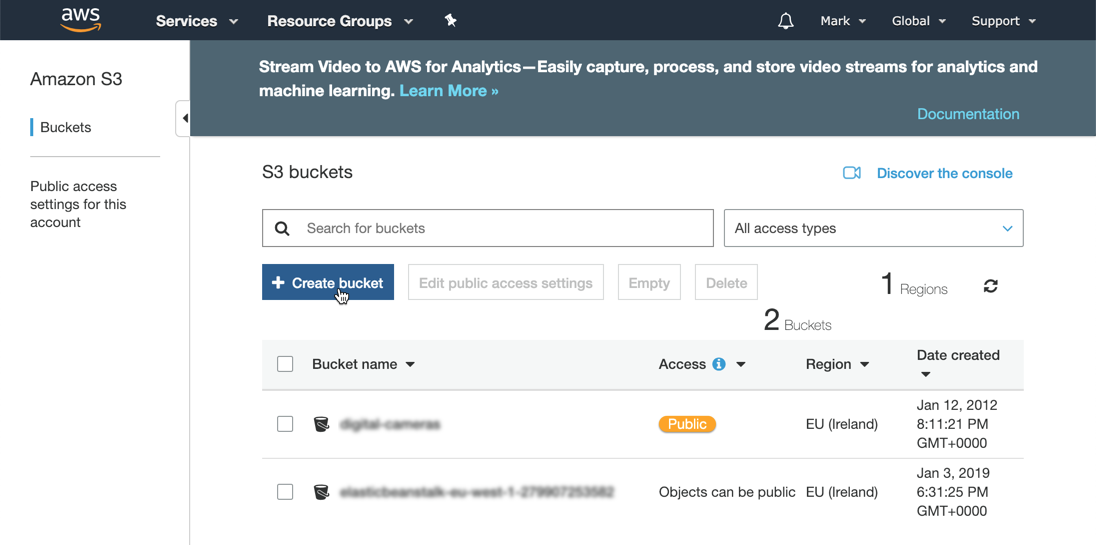
- Enter a bucket name, select a region and copy settings from an existing bucket if needed.

- Click
Nextthrough steps 2 and 3 and thenCreate bucketagain on step 4 and the new storage bucket will be created.

Step 3 – upload files
Upload the standard index.html file using the onscreen picker and selecting the default options.

- On the properties tab select
Static website hostingand select the optionUse this bucket to host a website, and enter index.html in the index document field. ClickSaveto complete the change.

Step 4 – set permissions
On the permission tab remove the restrictions on public access and click Save to commit the changes.
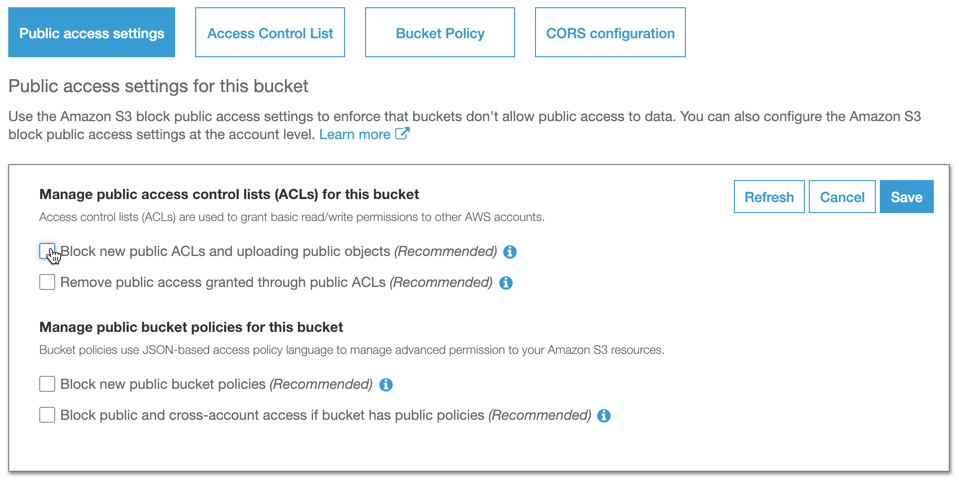
- On the bucket policy tab, enter the following policy to enable permission for unauthenticated users to access the files:
{
“Id”: “Policy1546543764975”,
“Version”: “2012-10-17”,
“Statement”: [
{
“Sid”: “Stmt1546543763921”,
“Action”: [
“s3:GetObject”
],
“Effect”: “Allow”,
“Resource”: “arn:aws:s3:::my-free-website/“, “Principal”: ““
}
]
}
- This policy syntax can be also be generated using the policy generator tool

- Once the permission has been granted, a notification will be displayed

- From the static hosting page click the link to view the hosted website


Summary
A simple a straight forward process, bit again no native source control from Git. AWS does offer CodeDeploy but you need to setup up resource groups, security groups and a Lamba pipeline to get this working. Compared to other offerings this feels like a big effort.











 Mark Cooper