Blog

  • Keyboard school day

    Keyboard school day

    For the most part I am a self taught web developer and, for the most part, this is OK, because I’m capable of learning what I need to, when I need to.

    Just-in-time knowledge.

    Today I’ve been showing my son how to write HTML and he asked me how I learned to type so fast and our conversation led us to https://www.typingclub.com

    What an eye opener. In the very first minute of the very first tutorial I learned something new. Something fundamental to the use of every QWERTY keyboard in existence…

    See those little tabs on the F & J keys…

    They are for finger alignment, so you can feel your way back to the right location on the keyboard.

    Boom. Mind blown.

    mind-blown

    Tell me I’m not the only one that didn’t know this?… anyone?

  • Time to reboot

    Time to reboot

    Throughout my career I’ve always loved my job. But recently I’ve struggled. I’ve been working on a lot of legacy projects, I’ve not been empowered to implement change and I’ve not been proud of the products I’ve been creating.

    This bothers me. It bothers me because I care.

    I need to reboot.

    I need to reengage with the development community.

    I need to deep dive into Azure and Firebase.

    I need to build an Angular application. And a probably a React.js application too.

    I need to break out the RaspberryPis and get them doing something. Anything.

  • Adding typescript to ASP.NET 2 WebForms project

    Adding typescript to ASP.NET 2 WebForms project

    If you are burdened with the technical debt of an old ASP.NET 2 Webforms project, then the chances are that you might not have had the chance to stay up-to-date with JavaScript revolution. A lot has changed with JavaScript in the past few years, and keeping up is a significant effort. So what should you do?

    tl;dr

    There is no silver bullet. You’ll need to take some time out to update your skills if you want to make use of the new standards and frameworks but it is possible to start incrementally updating an older application without doing a complete rewrite.

    So what do you need to understand?…

    JavaScript Standards

    If you do not know what ES5 or ES6 are – read this blog post first.

    When you first created your ASP.NET 2 application you would have been targetting a JavaScript standard known as ES5 (you might not have even known that you were using JavaScript at the time, but it is baked into the WebForms framework for handling postbacks).

    Important point: Different browsers support different versions of the JavaScript standards. Generally speaking ES5 is considered as supported everywhere.

    If you want to check if a JS standard  is supported in a specific browser then use the compatibility tables, for example:

    If you need to use a specific feature the you can make use of the website caniuse.com, for example:

    So we now know that there are different versions of JavaScript and the more recent versions are “better” than the older versions, but also that the newer versions aren’t supported across the board.

    This means that you can’t use the later versions if you still have users on older browsers. We already know that you are supporting an ASP.NET 2 application, which means that

    • It is a legacy application, so there is a fair chance that means that it is still used by people on older browsers that don’t support ES6+.
    • You are user driven and can’t force them to upgrade – perhaps they are corporate clients and pretty much dicate the terms.

    This is where you need to learn about compilation and transpilation…

    Compilers and Transpilers

    Transpilers (or source-to-source compilers) take code in one language and convert it to another language. Fortunately for us there are plenty of compilers that can convert scripts between different versions of JavaScript. You are likely to have heard of the following:

    Transpilers

    • Babel – a transpiler best known for its ability to turn ES6 into ES5
    • Webpack – a JS transpiler and CSS transpiler (LESS/SASS) and minifier

    Which one should you use? A very opinionated area and seeing as we are developing ASP.NET then my opinion is to use the hidden third option – Visual Studio 2017. This will also transpile, bundle and minify CSS and JS. Unless you have need to use an alternative you may as well use the features within VS 2017 to keep life simple.

    Supersets

    • TypeScript – a strongly typed superset of JavaScript that compiles to JavaScript.
    • CoffeeScript – a superset of JavaScript that compiles into JavaScript

    Which one should you use? This is a very opinionated area and my opinion is that TypeScript is the way to go based on the following.

    • TypeScript is managed by Microsoft (you are using ASP.NET WebForms so this should sit well with your current tech-stack)
    • TypeScript is at the heart of Angular, so it is also embraced by Google and their tech-stack
    • TypeScript is baked in to Visual Studio and VS Code – you don’t need to use Babel
    • TypeScript is a compiler and a type checker (which Babel is not)
    • Type checking capabilities are very important for large code bases
    • TypeScript will compile to ES3, ES5, ES6, ES2016, ES2017 or ESNext

    For more information on transpilation read this blog post.

    Command line

    Pretty much all modern frameworks and libraries are used via the command line (usually referred to as CLI – Command Line Interface).

    It is a big shift in the way you normally work, but it is powerful and quick. By building CLI tooling developers are able to iterate (and deal with cross platform) much faster than if they had to supporing complex UI’s and multiple IDE’s.

    Accept it. Learn it. Love it.

    Upgrade steps

    Depending on the exact details and structure of your application your steps might vary. The following is a guide to the steps that might be involved.

    Update Visual Studio

    Whilst I love VS Code for simple web apps, testing and proof of concept, Visual Studio is still my go-to editor for WebForms.

    To get the latest support for TypeScript you will need to use the latest version of Visual Studio.

    Update the solution

    • Make sure you are starting from a firm foundation – build and check-in your code without any changes using your current IDE. This is your fallback if something goes wrong.
    • Open the project in VS2017. Certain files will be updated (solution, project etc), so you’ll need to build and test again. Do this before making any further changes.

    Install Web Essentials

    If you don’t already have it, install the Web Essentials 2017 extensions into Visual Studio. This extension will deal with the JS tranpilation that you need.

    For more information see the Web Essentials website.

    Install Typescript 2.6 SDK

    There are a few tricks getting Typescript checked / installed / updated.

    Useful commands:

    • tsc -v – what version of the TypeScript compiler is running
    • where tsc – where are the installed versions of the TypeScript compiler
    • npm install -g typescript – install / update TypeScript as a node module
    • npm upgrade -g typescript – install / update TypeScript as a node module

    TypeScript 2.6 and VS2017 will automatically infer the shared types between files – it is no longer necessary to use triple-slashreferences for types.

    See https://docs.microsoft.com/en-us/visualstudio/ide/javascript-intellisense#Auto

    After transpilation you will want to bundle your files. These can be done with a bundleconfig.json file.

    NOTE: JS files are bundled in the order they are listed, so add base classes first.

    Build, test & commit

    At this point follow your usual process to build, test and commit your changes. This is a good point to fall back to if the something goes wrong in the subsequent steps.

  • Adding SQL MIME type to IIS 7

    Adding SQL MIME type to IIS 7

    To download a SQL file from an IIS hosted website the website needs to know how to handle the file.

    In general terms a SQL file is plain text, so the respective MIME type would be text/plain

    This can be added to IIS manually using the MIME types editor. Or for a more reliable approach add the MIME type to your application web.config file – this will make the settings portable so they get deployed with the application (and will work on any instance of IIS), for example;

    
    <configuration>
    
        <system.webServer>
    
            <staticContent>
    
                <mimeMap fileExtension=".sql" mimeType="text/plain" />
    
         </staticContent>
    
        </system.webServer>
    
    </configuration>
    
    
  • Working around Selenium

    Working around Selenium

    After you’ve used selenium for a while, you’ll be familiar with some of the problems.

    Yep, WaitForElement doesn’t exactly cover itself in glory. It is possible to work round this a bit using a static helper for retries. Something like this;

        public static void MyNavigateMethod(this IWebDriver driver, int retryCounter = 0)
        {
            try
            {
                driver.DoSomething();
    
                // select the "Return to third party checkbox
                driver.WaitForWebElement(By.Id("myElement")).Click();
            }
            catch (Exception ex)
            {
                if (retryCounter <= 5)
                {
                    // retry this again
                    retryCounter++;
                    Trace.WriteLine(string.Format(" - exception occurred: '{1}', retrying: {0}", retryCounter, ex.GetType().ToString()));
                    Thread.Sleep(retryCounter * retrySleep);
                    driver.MyNavigateMethod(retryCounter: retryCounter);
                }
                else
                {
                    Trace.Write(ex);
                    throw;
                }
            }
        }

    Here we have passed an optional retryCounter into the method, and then within the exception iterated this counter and get the method to call itself.

  • Converting performance data to reports

    Converting performance data to reports

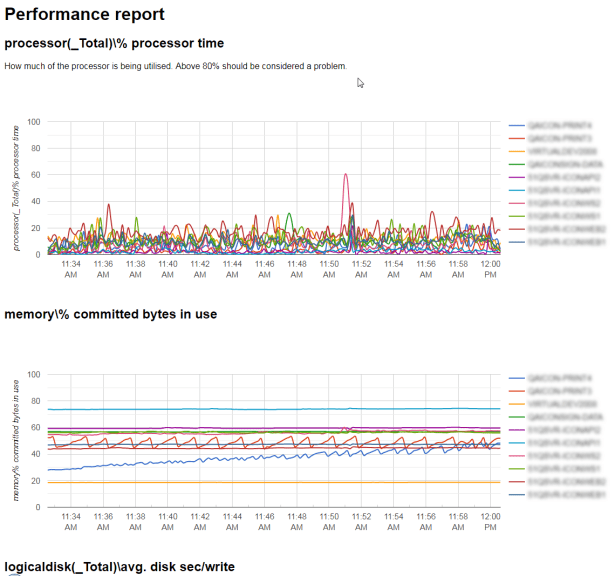
    In my previous article about collecting performance data from remote-servers we looked at a script for extracting perf-data from multiple servers.

    This script is used to convert the extracted CSV file into an HTML report.

    clear

    # define the first field in the file - this will be the x-axis for most graphs
    # and can also be eliminated from the report
    $timeField = "(PDH-CSV 4.0) (GMT Standard Time)(0)"

    $testId = 201611301041
    $inFilePath = "C:\jmeter\results\$testId"

    # add some start / end filters
    $startDate = Get-Date "2016-11-30 10:30:00"
    $endDate = Get-Date "2016-11-30 10:45:00"

    $headers = @()
    $counterNames = @()
    $dataSet = @()

    # Open the PerfMon CSV file
    $csv = Import-Csv $inFilePath\$testId.csv

    # extract a list of the headers
    $headers = $csv | Get-Member -MemberType NoteProperty | select name
    $headers

    # for each of the headers extract a unique list of the servers being monitored
    ForEach($header in ($headers | Where { $_ -notlike "*network*" }))
    {
    $counterName = ($header -split "\\\\")[2].Trim('}')
    if (-not $counterNames.Contains($counterName)){
    $counterNames += $counterName
    $counterName
    }
    }

    $counterNames = @("system\processor queue length",
    ".net clr exceptions(_global_)\# of exceps thrown / sec")


    # date/values "[date, value]" for use on the Google Chart

    # reuse the date strings if they haven't changed
    [datetime]$previousTime = Get-Date;

    # the date must be a JavaScript date, so some manipulation will be required.
    $jsDate = ""

    # loop through the CSV file and create a list of counters and
    $csv | Foreach-Object {
    foreach ($property in $_.PSObject.Properties)
    {
    $counterDate = [datetime]::ParseExact($_.$timeField, "MM/dd/yyyy HH:mm:ss.fff", $null)

    # if the record is before or after the threshold, ignore the data
    if ($counterDate -lt $startDate -or $counterDate -gt $endDate){
    "This row is out of the date range being processed."
    continue
    }

    # if the time hasn't changed since the last time, we don't need to process this again
    if ($previousTime -ne $counterDate){
    $jsDate = Get-Date $counterDate -format "yyyy,MM,dd,HH,mm,ss"
    $previousTime = $counterDate
    }
    That
    # if the value is empty, or property name is the same as the time field, don't include
    if (-not [String]::IsNullOrWhiteSpace($property.Value) -and $propertyName -ne $timeField) {

    $objDataRow = New-Object System.Object
    $objDataRow | Add-Member -type NoteProperty -name Name -value $property.Name
    $objDataRow | Add-Member -type NoteProperty -name Value -value ("[new Date({0}),{1}]" -f $jsDate, $property.Value)
    $dataSet += $objDataRow

    $objDataRow.Name.Substring(0,30) + ": " + $objDataRow.Value
    }
    }
    }

    [string] $headerName = ""

    # build html
    $html = "<html>`n"
    $html += "<head>`n"
    $html += "<script type='text/javascript' src='https://www.gstatic.com/charts/loader.js'></script>`n"
    $html += "
    <script type='text/javascript'>
    // Load the Visualization API and the corechart package.
    google.charts.load('current', {'packages':['corechart']});
    </script>`n"

    $html += "</head>`n"
    $html += "<body>`n"

    $html += "<h1>Performance report</h1>`n"

    ForEach($counterName in $counterNames){

    if ($counterName.Length -gt 0){
    $html += "<h2>{0}</h2>`n" -f $counterName

    # tidy up the name, so it can be used as a unique JS reference
    $jsCounterName = $counterName.Replace(" ","").Replace("/","").Replace("\","").Replace("#","").Replace(":","").Replace("(","").Replace(")","").Replace("%","").Replace("[","").Replace("]","").Replace(".","").Replace("-","").Replace("_","").Replace("{","").Replace("}","")
    $jsCounterName

    # loop through each header to find the like-for-like counters
    ForEach($header in $headers | Where { $_.Name -like "*$counterName*"}) {

    # if there aren't any records, don't output it
    if (($dataSet | Where { $_.Name -eq $header.Name } | Measure ) -eq 0){
    continue
    }

    $chartData = [string]::Join(",",($dataSet | Where { $_.Name -eq $header.Name } | Select -ExpandProperty Value ))
    }

    $html += ("<div id='{0}_chart_div'></div>`n" -f $jsCounterName)

    $html += "<script type='text/javascript'>
    // Set a callback to run when the Google Visualization API is loaded.
         google.charts.setOnLoadCallback(drawChart" + $jsCounterName + ");

         function drawChart" + $jsCounterName + "() {
                 // Create the data table.
                 var data = new google.visualization.DataTable();
                 data.addColumn('date', 'Time');

                 data.addColumn('number');
                 data.addRows([" + $chartData + "]);

                 data.addColumn('number');
                 data.addRows([" + $chartData + "]);


                 // Set chart options
                 var options = {'title':title,
                             'width':600,
                             'height':300};

                 // Instantiate and draw our chart, passing in some options.
                 var chart = new google.visualization.LineChart(document.getElementById('" + $jsCounterName + "_chart_div'));
                 chart.draw(data, options);
             }
    </script>`n"
    $html += "<hr>`n"
    }
    }

    $html += "</body>`n"
    $html += "</html>`n"

    $html | out-file -force -Encoding ascii "$inFilePath\$testId.html"

    This will extract data from the saved CSV file, and create an HTML file using the rich Google Chart API to generate the graphs.

  • Collect performance data from remote servers

    Collect performance data from remote servers

    To collect performance data from remote servers, when running a load test for example, use the following PowerShell script:

    clear
    $testId = "doodle"
    $durationSeconds = 20
    $threadsPerAgent = 5
    $client = ""
    $counterList = @(
    ".NET CLR Exceptions()# of Exceps Thrown / sec",
    ".NET CLR Memory()# Total committed Bytes",
    "\ASP.NET\Application Restarts",
    "\ASP.NET\Request Wait Time",
    "\ASP.NET\Requests Queued",
    "\ASP.NET Applications()\Requests/Sec",
    "\Web Service()\Current Connections",
    "\Web Service()\Get Requests/sec",
    "\Web Service()\Post Requests/sec",
    "\LogicalDisk()\Avg. Disk sec/Read",
    "\LogicalDisk()\Avg. Disk sec/Write",
    "\LogicalDisk()\Disk Transfers/sec",
    "\LogicalDisk(C:)\% Free Space",
    "\LogicalDisk()\Avg. Disk Queue Length",
    "\Memory\Available MBytes",
    "\Memory\Pages/sec",
    "\Processor()\% Processor Time",
    "\System\Processor Queue Length",
    "\Network Interface()\Bytes Received/sec",
    "\Network Interface()\Bytes Sent/sec",
    "\SQLServer:Buffer Manager\Buffer cache hit ratio",
    "\SQLServer:Buffer Manager\Page life expectancy",
    "\SQLServer:Locks()\Number of Deadlocks/sec",
    "\SQLServer:Locks()\Lock Waits/sec",
    "\SQLServer:Databases()\Transactions/sec"
    )
    $computers = "SERVERNAME1","SERVERNAME2","SERVERNAME3"
    Get-Counter -counter $counterList -ComputerName $computers -MaxSamples 308 -SampleInterval 5 | Export-Counter -Path C:\jmeter\results\$testId.blg -FileFormat BLG -Force

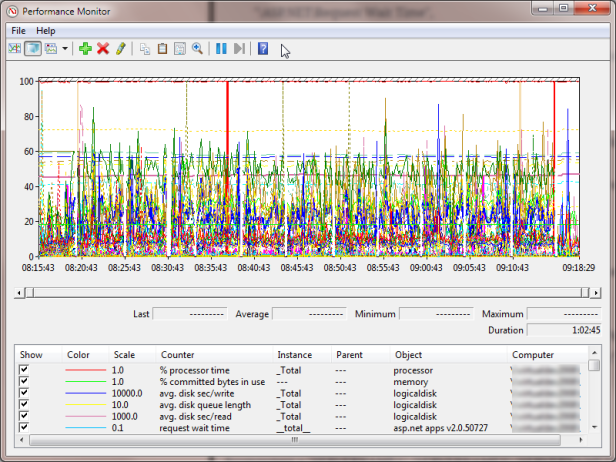
    The output will be a .blg file. Open this to see all your data.

    You can right-click | Save data as to export this information to CSV for easier use.

  • Goldilocks and the 3 reseller packages

    Goldilocks and the 3 reseller packages

    Goldilocks was walking through the wood one winters day when she came across a house with three computers. (Yes there was also fibre broadband installed – it’s a tech savvy wood – get over it!)

    The first computer was connected to Fasthosts. A solid offering she thought, back by over a decade of experience. But their lack of .NET4 support was apalling. Ergghh  – too salty!

    The second computer was connected to Cyberhostpro. It was cheap, but lacked finesse. It  took too much time to set up and manage. Ewww – too sweet.

    The last computer was connected to Heart Internet. Not the cheapest, but not the most expensive. .NET4 support and fully brandable. Mmmm – Just right.

    She migrated all her websites with ease, and got excellent customer support when she got stuck. She skipped happily outside and got eaten by a wolf. The end.

    I’ve found my migration to Heart Internet a wholly pleasant experience.  The online administration features are sophisticated. There are enough tools to do what I need, but not so many that it detriments user experience. There are also a smattering of cleverly configured scripts to cutout some of the heavy lifting on frequent tasks – such as setting Google Apps DNS.

    Ultimately – I Heart Internet. I’m happy.

    Oh and, if I win their fantastic Christmas Home Office Giveaway, I’ll be even happier 🙂

  • Arduino Uno 101: Using the SparkFun Inventor’s Kit (UK)

    Arduino Uno 101: Using the SparkFun Inventor’s Kit (UK)

    I’m an experienced programmer, but have only ever touched on electronics during A-levels and my degree course. New developer boards Arduino open up the world of micro-electronics to those with little or no experience. This is the start of my adventure:

    The kit I brought was the SparkFun Inventor’s Kit for Arduino with Retail Case resold by Relchron. I had read that it was possible to get a working example up and running in under an hour and found that was easily true.

    SparkFun Inventors Kit - Closed SparkFun Inventors Kit - Open

    The kit is neatly packaged, and all the items are well protected. The Arduino Board (in this case an Arduino Uno variant) felt very professional indeed. It was in a high quality box, printed inside and out, with a quality seal, detailed leaflet and geeky sticker pack. The extra effort and cost of all these small additions adds a air of quality to board. Confidence in this little fella is high!
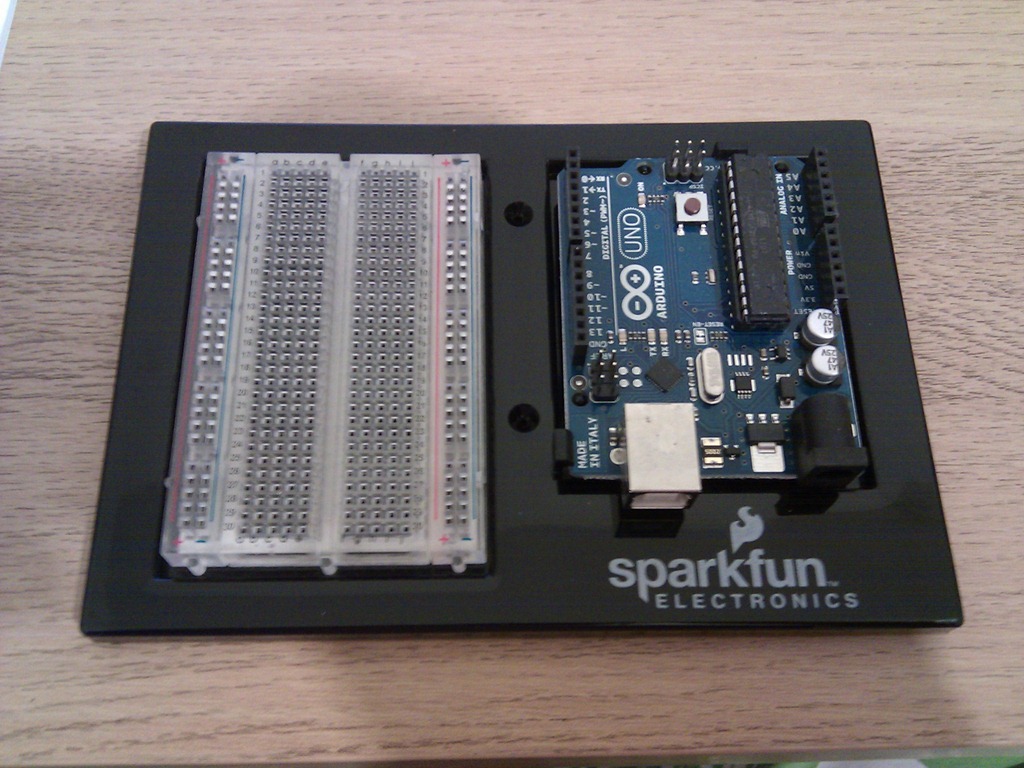
    Arduino Uno in Box Breadboard, Arduino Uno and Project Holder

    The kit also comes with a mini Breadboard, project templates (that fit neatly over the breadboard telling you where to plug the components in) and neat holder that holds the breadboard and Uno together nicely.

    Development Software

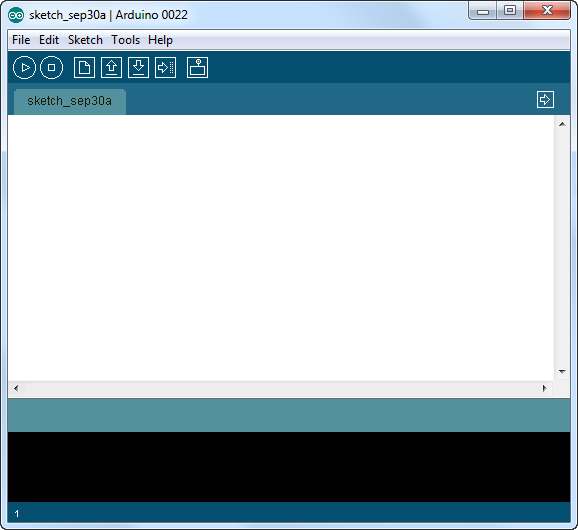
    The Arduino Development Software is downloaded and installed from http://www.arduino.cc. I’m running this on Windows 7 Ultimate 64Bit without any issues.

    SNAGHTMLaf57058  IMG_20110929_194717

    Connection

    The Arduino is connected via a USB cable (old style, massive end, no idea why they haven’t used micro usb!?). The lead is included in the pack. Once connected you have to jump through some hoops to install the drivers, but this is an issue with Win7, not the Uno. Details for doing this are in the included booklet.

    IMG_20110929_194742 IMG_20110929_195223

    Once connected, the Uno will appear under a serial COM port in the Device Manager.

    Getting Started: 101

    The first ‘101’ project to build is a simple blinking LED. Yep I know this is no iPhone 5, but it’s a sensible starting point for a novice to learn the core features of the board.

    1. Using the provided pins, attach the CIRC-01 overlay on top of the breadboard.
    2. Build the circuit as described on the overlay.
    3. Connect the USB

    That’s it. If it’s all connected properly the LED will start blinking. This must be a default program (“Sketch”) that is already loaded into the board. But obviously a core part of this kit is to program it yourself. So;

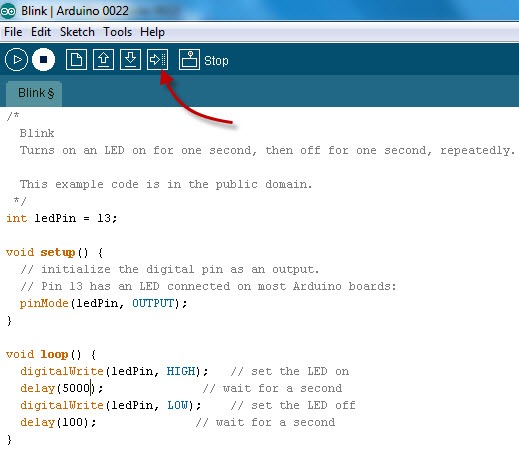
    1. In the Arduino Application, select File | Examples | 1. Basics | Blink. This will load a “blinking sketch” into the application.
    2. Modify the sketch, by changing some of the delays for example.
    3. Click the Upload button

    IMG_20110929_201200 IMG_20110929_195239

    The new Sketch will be uploaded to the Arduino and start immediately. With only a few tweaks to the Sketch you can setup a very simple morse code SOS blink:

    /*
    
      Morse SOS
    
      This example code is in the public domain.
    
     */
    
    int pinLed = 13;
    
    int dotDelay = 200;
    
    int dashDelay = 600;
    
    int letterPause = 1000;
    
    int loopPause = 2000;
    
    void setup() {
    
      // initialize the digital pin as an output.
    
      // Pin 13 has an LED connected on most Arduino boards:
    
      pinMode(pinLed, OUTPUT);
    
    }
    
    void loop() {
    
      // could be wrapped in a loop, but IMHO this reads better, so more maintainable.
    
      // S
    
      dot();
    
      dot();
    
      dot();
    
      cycleLed(letterPause);
    
      // O
    
      dash();
    
      dash();
    
      dash();
    
      cycleLed(letterPause);
    
      // S
    
      dot();
    
      dot();
    
      dot();
    
      cycleLed(loopPause);
    
    }
    
    void dot(){
    
      cycleLed(dotDelay);
    
    }
    
    void dash(){
    
      cycleLed(dashDelay);
    
    }
    
    void cycleLed(int cycleLedTime){
    
      digitalWrite(pinLed, HIGH);   // set the LED on
    
      delay(cycleLedTime);              // wait for a second
    
      digitalWrite(pinLed, LOW);    // set the LED off
    
      delay(cycleLedTime);
    
    }

    IMG_20110929_201147

    And we’re done. All in all, this took about 25-30 mins… so, what shall I build next?…hmmm…

  • Arduino Uno (UK)

    Today I got an Arduino Uno and I’m getting my geek on!

    IMG_20110929_194544