Category: Technical

  • Adding SQL MIME type to IIS 7

    Adding SQL MIME type to IIS 7

    To download a SQL file from an IIS hosted website the website needs to know how to handle the file.

    In general terms a SQL file is plain text, so the respective MIME type would be text/plain

    This can be added to IIS manually using the MIME types editor. Or for a more reliable approach add the MIME type to your application web.config file – this will make the settings portable so they get deployed with the application (and will work on any instance of IIS), for example;

    
    <configuration>
    
        <system.webServer>
    
            <staticContent>
    
                <mimeMap fileExtension=".sql" mimeType="text/plain" />
    
         </staticContent>
    
        </system.webServer>
    
    </configuration>
    
    
  • Working around Selenium

    Working around Selenium

    After you’ve used selenium for a while, you’ll be familiar with some of the problems.

    Yep, WaitForElement doesn’t exactly cover itself in glory. It is possible to work round this a bit using a static helper for retries. Something like this;

        public static void MyNavigateMethod(this IWebDriver driver, int retryCounter = 0)
        {
            try
            {
                driver.DoSomething();
    
                // select the "Return to third party checkbox
                driver.WaitForWebElement(By.Id("myElement")).Click();
            }
            catch (Exception ex)
            {
                if (retryCounter <= 5)
                {
                    // retry this again
                    retryCounter++;
                    Trace.WriteLine(string.Format(" - exception occurred: '{1}', retrying: {0}", retryCounter, ex.GetType().ToString()));
                    Thread.Sleep(retryCounter * retrySleep);
                    driver.MyNavigateMethod(retryCounter: retryCounter);
                }
                else
                {
                    Trace.Write(ex);
                    throw;
                }
            }
        }

    Here we have passed an optional retryCounter into the method, and then within the exception iterated this counter and get the method to call itself.

  • Collect performance data from remote servers

    Collect performance data from remote servers

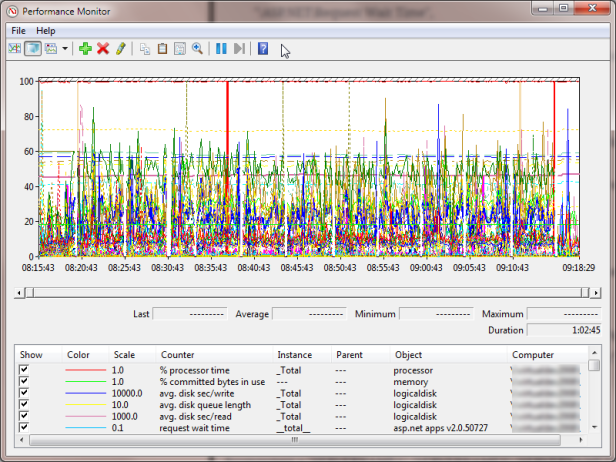
    To collect performance data from remote servers, when running a load test for example, use the following PowerShell script:

    clear
    $testId = "doodle"
    $durationSeconds = 20
    $threadsPerAgent = 5
    $client = ""
    $counterList = @(
    ".NET CLR Exceptions()# of Exceps Thrown / sec",
    ".NET CLR Memory()# Total committed Bytes",
    "\ASP.NET\Application Restarts",
    "\ASP.NET\Request Wait Time",
    "\ASP.NET\Requests Queued",
    "\ASP.NET Applications()\Requests/Sec",
    "\Web Service()\Current Connections",
    "\Web Service()\Get Requests/sec",
    "\Web Service()\Post Requests/sec",
    "\LogicalDisk()\Avg. Disk sec/Read",
    "\LogicalDisk()\Avg. Disk sec/Write",
    "\LogicalDisk()\Disk Transfers/sec",
    "\LogicalDisk(C:)\% Free Space",
    "\LogicalDisk()\Avg. Disk Queue Length",
    "\Memory\Available MBytes",
    "\Memory\Pages/sec",
    "\Processor()\% Processor Time",
    "\System\Processor Queue Length",
    "\Network Interface()\Bytes Received/sec",
    "\Network Interface()\Bytes Sent/sec",
    "\SQLServer:Buffer Manager\Buffer cache hit ratio",
    "\SQLServer:Buffer Manager\Page life expectancy",
    "\SQLServer:Locks()\Number of Deadlocks/sec",
    "\SQLServer:Locks()\Lock Waits/sec",
    "\SQLServer:Databases()\Transactions/sec"
    )
    $computers = "SERVERNAME1","SERVERNAME2","SERVERNAME3"
    Get-Counter -counter $counterList -ComputerName $computers -MaxSamples 308 -SampleInterval 5 | Export-Counter -Path C:\jmeter\results\$testId.blg -FileFormat BLG -Force

    The output will be a .blg file. Open this to see all your data.

    You can right-click | Save data as to export this information to CSV for easier use.

  • Goldilocks and the 3 reseller packages

    Goldilocks and the 3 reseller packages

    Goldilocks was walking through the wood one winters day when she came across a house with three computers. (Yes there was also fibre broadband installed – it’s a tech savvy wood – get over it!)

    The first computer was connected to Fasthosts. A solid offering she thought, back by over a decade of experience. But their lack of .NET4 support was apalling. Ergghh  – too salty!

    The second computer was connected to Cyberhostpro. It was cheap, but lacked finesse. It  took too much time to set up and manage. Ewww – too sweet.

    The last computer was connected to Heart Internet. Not the cheapest, but not the most expensive. .NET4 support and fully brandable. Mmmm – Just right.

    She migrated all her websites with ease, and got excellent customer support when she got stuck. She skipped happily outside and got eaten by a wolf. The end.

    I’ve found my migration to Heart Internet a wholly pleasant experience.  The online administration features are sophisticated. There are enough tools to do what I need, but not so many that it detriments user experience. There are also a smattering of cleverly configured scripts to cutout some of the heavy lifting on frequent tasks – such as setting Google Apps DNS.

    Ultimately – I Heart Internet. I’m happy.

    Oh and, if I win their fantastic Christmas Home Office Giveaway, I’ll be even happier 🙂

  • Arduino Uno 101: Using the SparkFun Inventor’s Kit (UK)

    Arduino Uno 101: Using the SparkFun Inventor’s Kit (UK)

    I’m an experienced programmer, but have only ever touched on electronics during A-levels and my degree course. New developer boards Arduino open up the world of micro-electronics to those with little or no experience. This is the start of my adventure:

    The kit I brought was the SparkFun Inventor’s Kit for Arduino with Retail Case resold by Relchron. I had read that it was possible to get a working example up and running in under an hour and found that was easily true.

    SparkFun Inventors Kit - Closed SparkFun Inventors Kit - Open

    The kit is neatly packaged, and all the items are well protected. The Arduino Board (in this case an Arduino Uno variant) felt very professional indeed. It was in a high quality box, printed inside and out, with a quality seal, detailed leaflet and geeky sticker pack. The extra effort and cost of all these small additions adds a air of quality to board. Confidence in this little fella is high!

    Arduino Uno in Box Breadboard, Arduino Uno and Project Holder

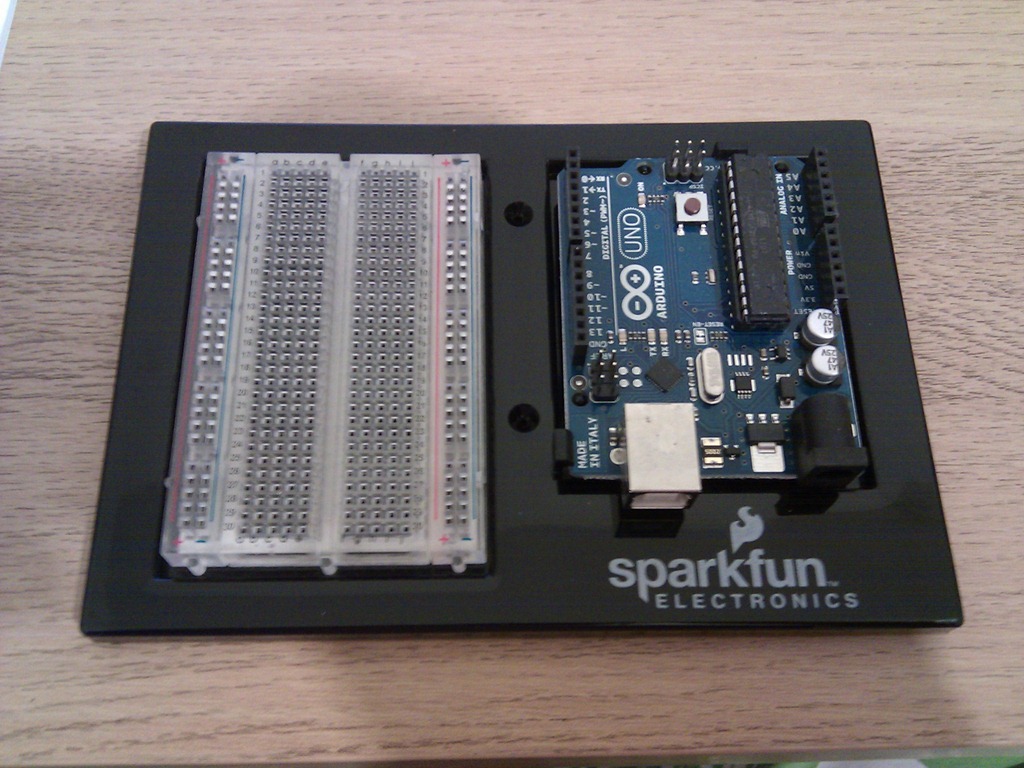
    The kit also comes with a mini Breadboard, project templates (that fit neatly over the breadboard telling you where to plug the components in) and neat holder that holds the breadboard and Uno together nicely.

    Development Software

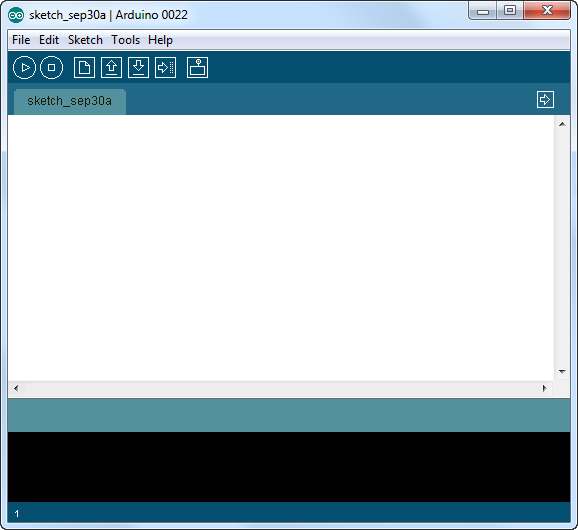
    The Arduino Development Software is downloaded and installed from http://www.arduino.cc. I’m running this on Windows 7 Ultimate 64Bit without any issues.

    SNAGHTMLaf57058  IMG_20110929_194717

    Connection

    The Arduino is connected via a USB cable (old style, massive end, no idea why they haven’t used micro usb!?). The lead is included in the pack. Once connected you have to jump through some hoops to install the drivers, but this is an issue with Win7, not the Uno. Details for doing this are in the included booklet.

    IMG_20110929_194742 IMG_20110929_195223

    Once connected, the Uno will appear under a serial COM port in the Device Manager.

    Getting Started: 101

    The first ‘101’ project to build is a simple blinking LED. Yep I know this is no iPhone 5, but it’s a sensible starting point for a novice to learn the core features of the board.

    1. Using the provided pins, attach the CIRC-01 overlay on top of the breadboard.
    2. Build the circuit as described on the overlay.
    3. Connect the USB

    That’s it. If it’s all connected properly the LED will start blinking. This must be a default program (“Sketch”) that is already loaded into the board. But obviously a core part of this kit is to program it yourself. So;

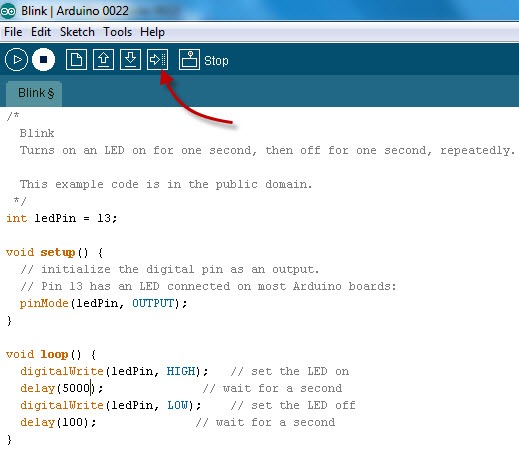
    1. In the Arduino Application, select File | Examples | 1. Basics | Blink. This will load a “blinking sketch” into the application.
    2. Modify the sketch, by changing some of the delays for example.
    3. Click the Upload button

    IMG_20110929_201200 IMG_20110929_195239

    The new Sketch will be uploaded to the Arduino and start immediately. With only a few tweaks to the Sketch you can setup a very simple morse code SOS blink:

    /*
    
      Morse SOS
    
      This example code is in the public domain.
    
     */
    
    int pinLed = 13;
    
    int dotDelay = 200;
    
    int dashDelay = 600;
    
    int letterPause = 1000;
    
    int loopPause = 2000;
    
    void setup() {
    
      // initialize the digital pin as an output.
    
      // Pin 13 has an LED connected on most Arduino boards:
    
      pinMode(pinLed, OUTPUT);
    
    }
    
    void loop() {
    
      // could be wrapped in a loop, but IMHO this reads better, so more maintainable.
    
      // S
    
      dot();
    
      dot();
    
      dot();
    
      cycleLed(letterPause);
    
      // O
    
      dash();
    
      dash();
    
      dash();
    
      cycleLed(letterPause);
    
      // S
    
      dot();
    
      dot();
    
      dot();
    
      cycleLed(loopPause);
    
    }
    
    void dot(){
    
      cycleLed(dotDelay);
    
    }
    
    void dash(){
    
      cycleLed(dashDelay);
    
    }
    
    void cycleLed(int cycleLedTime){
    
      digitalWrite(pinLed, HIGH);   // set the LED on
    
      delay(cycleLedTime);              // wait for a second
    
      digitalWrite(pinLed, LOW);    // set the LED off
    
      delay(cycleLedTime);
    
    }

    IMG_20110929_201147

    And we’re done. All in all, this took about 25-30 mins… so, what shall I build next?…hmmm…

  • Extract URL Information

    Extract URL Information

    To get information about the currently requested URL in ASP.NET use the Request.Url class. For example to extract the information from the URL http://www.example.com/myApp/myPage.aspx?myQs=14 the Request.Url class provides the following properties:

    Request.Url = "http://www.example.com/myApp/myPage.aspx?myQs=14"
    Request.Url.AbsolutePath: "/myApp/myPage.aspx"
    Request.Url.AbsoluteUri: "http://www.example.com/myApp/myPage.aspx?myQs=14"
    Request.Url.Authority: "www.example.com"
    Request.Url.DnsSafeHost: "www.example.com"
    Request.Url.Fragment: ""
    Request.Url.Host: "www.example.com"
    Request.Url.HostNameType: Dns
    Request.Url.IsAbsoluteUri: true
    Request.Url.IsDefaultPort: true
    Request.Url.IsFile: false
    Request.Url.IsLoopback: true
    Request.Url.IsUnc: false
    Request.Url.LocalPath: "/myApp/myPage.aspx"
    Request.Url.OriginalString: "http://www.example.com:80/myApp/myPage.aspx?myQs=14"
    Request.Url.PathAndQuery: "/myApp/myPage.aspx?myQs=14"
    Request.Url.Port: 80
    Request.Url.Query: "?myQs=14"
    Request.Url.Scheme: "http"
    Request.Url.Segments: {string[3]}
    Request.Url.UserEscaped: false
    Request.Url.UserInfo: ""
  • Entity Framework: StoreGeneratedPattern="Computed"

    Entity Framework: StoreGeneratedPattern="Computed"

    We recently had a problem where our fields with default values where not getting properly populated in the database during row creation. This can occur when the EDMX model is created in the designer and the default fields do not have their StoreGeneratedPattern property set to Computed or Identity.

    Easy enough to fix, simply open the model in the VS designer, select the field, open the properties view and make the required changes.

    However we have also seen a problem where these fields are still not getting set correctly even after this change has been applied. Looking into the EDMX model within an XML view we can see that in some cases the StoreGeneratedPattern=Computed property has been retained on the Entity, but removed from the EntitySet, for example:

    Entity: Product

    <entitytype name="Product">
    <key>
    <propertyref name="ProductId" />
    </key>
    <property name="ProductId" type="Int32" nullable="false"></property>
    <property name="ProductDescription" type="String" maxlength="30" fixedlength="false" unicode="false"></property>
    <property name="ProductType" type="String" maxlength="1" fixedlength="true" unicode="false"></property>
    <property name="EntityRowID" type="Guid" nullable="false" annotation:storegeneratedpattern="Computed"></property>
    <property name="EntityLastUpdated" type="DateTime" nullable="false" annotation:storegeneratedpattern="Computed"></property>
    <property name="EntityIsDeleted" type="Boolean" nullable="false" annotation:storegeneratedpattern="Computed"></property>
    </entitytype>
    

    EntitySet: Products

    The StoreGeneratedPattern has gone missing 😦

    <entitytype name="Products">
    <key>
    <propertyref name="ProductId" />
    </key>
    <property name="ProductId" nullable="false" type="Int32"></property>
    <property name="ProductDescription" type="String" unicode="false" fixedlength="false" maxlength="30"></property>
    <property name="ProductType" type="String" unicode="false" fixedlength="true" maxlength="1"></property>
    <property name="EntityRowID" nullable="false" type="Guid"></property>
    <property name="EntityLastUpdated" nullable="false" type="DateTime"></property>
    <property name="EntityIsDeleted" nullable="false" type="Boolean"></property>
    </entitytype>
    

    This has occurred on a lot of tables, and we don’t know how or why that has crept in. To fix this we have had to manually fix up the XML file for the EntitySets effected:

    <entitytype name="Products">
    <key>
    <propertyref name="ProductId" />
    </key>
    <property name="ProductId" nullable="false" type="Int32"></property>
    <property name="ProductDescription" type="String" unicode="false" fixedlength="false" maxlength="30"></property>
    <property name="ProductType" type="String" unicode="false" fixedlength="true" maxlength="1"></property>
    <property name="EntityRowID" nullable="false" type="Guid" storegeneratedpattern="Computed"></property>
    <property name="EntityLastUpdated" nullable="false" type="DateTime" storegeneratedpattern="Computed"></property>
    <property name="EntityIsDeleted" nullable="false" type="Boolean" storegeneratedpattern="Computed"></property>
    </entitytype>
    
  • The Art Of Unit Testing, TDD

    The Art Of Unit Testing, TDD

    My quote-of-the-day, regarding Test Driven Development:

    I am convinced that it [TDD] can work to your benefit, but it’s not without a price (time to learn, time to implement, and more). It’s definitely worth the admission price, though.

    Taken from the excellent The Art of Unit Testing: with Examples in .NET by Roy Osherove.

  • Real World: Unit Testing Queries Against Entity Framework (EF) Model / Repositories

    Real World: Unit Testing Queries Against Entity Framework (EF) Model / Repositories

    Unit testing is a tricky beast. As with all unit tests it is important to abstract any dependencies – so in the case of EF it’s the data persistence source. This must be handled carefully because EF creates a container that performs the interaction with the data source. Abstracting that container (via mocking or stubbing) is painfully hard.

    There are a few approaches for doing this, this is mine. I’m using the following tooling:

    The pattern uses the following DAL class structure (like a pseudo-repository pattern against an example Product database table):

    • ProductDataRepository: IProductDataRepository – A thin layer to EF, returns only IQueryable<T> types from raw EF lookups. No filters, sorting or other queries are applied here as this class is not unit testable. This class internal to the DAL assembly.
    • ProductRepository(IProductDataRepository repos) – Constructor takes an instance of the IProductDataRepository interface, and uses this for executing specific queries against the base IQueryable<T> values. This class is exposed for external calls. This is unit-tested.

    The unit tests can use Moles to stub an instance of IProductDataRepository (delegating the internal Get… methods to returning a hard coded collection of test data) that is then passed to the instance of ProductRepository under test.

    Looking at these classes from the bottom up, as an example:

    ProductDataRepository

    To Provide a thin layer that only returns IQueryable<T> (our example also filters out deleted rows):

    public class ProductDataRepository : IProductDataRepository {
    
    private MyDatabase_ModelContainer _model;
    protected internal MyDatabase_ModelContainer Model {
    get {
    if (_model == null) {
    _model = new MyDatabase_ModelContainer();
    }
    return _model;
    }
    }
    
    public IQueryable<product> GetProducts() {
    return Model.Products.Where(p => p.IsTombstoned == false);
    }
    }
    

    ProductRepository

    Core Requirement: Provide the implementation and execution of the data lookup. Consumes an instance of IProductDataRepository via constructor injection.

    public class ProductRepository{
    public ProductRepository() : this(new ProductDataRepository()) {
    }
    
    private IProductDataRepository _mRepository;
    public ProductRepository (IProductDataRepository iRepository) {
    _mRepository = iRepository;
    }
    
    public Product GetProduct(String productKey) {
    return mRepository.GetProducts().FirstOrDefault(p => p.ProductKey.Contains(productKey));
    }
    
    public List<Product> GetProducts (String productKey) {
    return mRepository.GetProducts().Where(p => p.ProductKey.Contains(productKey).ToList();
    }
    }
    

    So, we can see that this is making calls to:

    mRepository.GetProducts()

    Which returns an IQueryable<T> type, then implements required functionality:

    .Where(p => p.ProductKey.Contains(productKey))

    and then executes the Query:

    .ToList();

    GetProductsTest

    To test the ProductRepository we can create an instance and stub the IProductDataRepository. The mocking and standard setup is done in an abstract class, to provide reusability for other tests that may require this functionality:

        [TestClass]
    public abstract class ProductTestContext
    {
    private IProductDataRepository _dataRepository;
    private IProductDataRepository DataRepository
    {
    get {
    if (_dataRepository == null) {
    _dataRepository = new SIProductDataRepository() {
    GetProducts = () => Products.AsQueryable()
    };
    }
    return _dataRepository;
    }
    }
    
    private ProductRepository _ProductRepository;
    public ProductRepository ProductRepository
    {
    get {
    if (_ProductRepository == null) {
    _ProductRepository = new ProductRepository(DataRepository);
    }
    return _ProductRepository;
    }
    }
    
    private List<Product> _products;
    public List<Product> Products
    {
    get {
    if (_products == null) {
    _products = new List<Product>();
    
    for (int i = 1; i <= 9; i++) {
    _products.Add(new Product(){ ProductKey = "MyKey" + i });
    }
    }
    return _products;
    }
    }
    
    }
    

    So, here we can see the IProductDataRepository readonly property returns a stubbed instance new new SIProductDataRepository. This stub is generated by the Moles framework (see Moles documentation on how to do this). During the creation of this object we delegate the GetVouchers method to return the concrete (and hardcoded because this is a unit test) instance of Products.AsQueryable():

    GetProducts = () => Products.AsQueryable()

    The .AsQueryable() is essential to insure the instance of IProductDataRepository, that is used during the test, returns the same type as the instance used in the real world.

    Now our unit test class can inherit ProductTestContext and Arrange, Act and Assert the required tests easily:

        [TestClass]
    public class GetProductsTest : ProductTestContext
    {
    
    [TestMethod]
    public void GetSingleProduct()
    {
    // repeat the test for each instance in the test collection
    for (int i = 1; i <= 9; i++) {
    // Arrange – most of the Arrangement is done in the abstract
    var goodProductKey = "MyKey" + i;
    
    // Act – on the abstract instance of ProductRepository,
    //            which is using the stubbed instance of ProductDataRepository
    var product = ProductRepository.GetProduct(goodProductKey);
    
    // Assert – make sure the correct product is returned from the stubbed data
    Assert.IsNotNull(product);
    Assert.IsTrue(product.ProductKey.Equals(goodProductKey));
    }
    }
    
    [TestMethod]
    public void GetIndivudalFilteredProducts()
    {
    // repeat the test for each instance in the test collection
    for (int i = 1; i <= 9; i++) {
    // Arrange – most of the Arrangement is done in the abstract
    var goodProductKey = "MyKey" + i;
    
    // Act – on the abstract instance of ProductRepository,
    //            which is using the stubbed instance of ProductDataRepository
    var products = ProductRepository.GetProducts(goodProductKey);
    
    // Assert – make sure the correct products are returned from the stubbed data
    Assert.IsNotNull(products);
    Assert.IsTrue(products.Count == 1);
    }
    }
    
    [TestMethod]
    public void GetMultipleFilteredProducts()
    {
    // Expectation – all the results in the abstract Products collection should be returned
    var expectation = Products.Count;
    
    // Arrange – most of the Arrangement is done in the abstract
    var goodProductKey = "MyKey";
    
    // Act – on the abstract instance of ProductRepository,
    //            which is using the stubbed instance of ProductDataRepository
    var products = ProductRepository.GetProducts(goodProductKey);
    
    // Assert – make sure the correct products are returned from the stubbed data
    Assert.IsNotNull(products);
    Assert.AreEqual(expectation, products.Count);
    }
    }

    
  • Microsoft Mocking

    Microsoft Mocking

    As a .NET developer I don’t like using third party controls when there is tooling available from MS that will do the job I need. For example I prefer using the “baked in” MSTest suit as opposed to NUnit or MBUnit.

    The same is true for a mocking framework. I have tried with varying levels of success to implement licenced and open-source variants, for example;

    • JustMock
    • TypeMocks
    • Moq
    • Rhino

    Then I found Microsoft Moles (part of the Pex toolkit) from MS Research labs. These tools are not officially released not supported, but they have matured for a couple of years, and whilst not as fully featured as something like JustMock, it has enough functionality to do what I need – simple mocking and stubbing and delegation of methods and properties.

    With Moles I managed stub my data access repository (with a little refactoring) with very satisfactory results:Real World: Unit Testing Queries Against Entity Framework (EF) Model / Repositories