Tag: .NET

  • Collect performance data from remote servers

    Collect performance data from remote servers

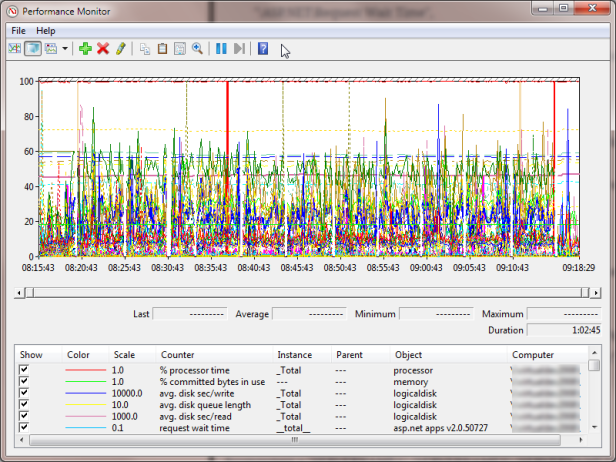
    To collect performance data from remote servers, when running a load test for example, use the following PowerShell script:

    clear
    $testId = "doodle"
    $durationSeconds = 20
    $threadsPerAgent = 5
    $client = ""
    $counterList = @(
    ".NET CLR Exceptions()# of Exceps Thrown / sec",
    ".NET CLR Memory()# Total committed Bytes",
    "\ASP.NET\Application Restarts",
    "\ASP.NET\Request Wait Time",
    "\ASP.NET\Requests Queued",
    "\ASP.NET Applications()\Requests/Sec",
    "\Web Service()\Current Connections",
    "\Web Service()\Get Requests/sec",
    "\Web Service()\Post Requests/sec",
    "\LogicalDisk()\Avg. Disk sec/Read",
    "\LogicalDisk()\Avg. Disk sec/Write",
    "\LogicalDisk()\Disk Transfers/sec",
    "\LogicalDisk(C:)\% Free Space",
    "\LogicalDisk()\Avg. Disk Queue Length",
    "\Memory\Available MBytes",
    "\Memory\Pages/sec",
    "\Processor()\% Processor Time",
    "\System\Processor Queue Length",
    "\Network Interface()\Bytes Received/sec",
    "\Network Interface()\Bytes Sent/sec",
    "\SQLServer:Buffer Manager\Buffer cache hit ratio",
    "\SQLServer:Buffer Manager\Page life expectancy",
    "\SQLServer:Locks()\Number of Deadlocks/sec",
    "\SQLServer:Locks()\Lock Waits/sec",
    "\SQLServer:Databases()\Transactions/sec"
    )
    $computers = "SERVERNAME1","SERVERNAME2","SERVERNAME3"
    Get-Counter -counter $counterList -ComputerName $computers -MaxSamples 308 -SampleInterval 5 | Export-Counter -Path C:\jmeter\results\$testId.blg -FileFormat BLG -Force

    The output will be a .blg file. Open this to see all your data.

    You can right-click | Save data as to export this information to CSV for easier use.

  • The Art Of Unit Testing, TDD

    The Art Of Unit Testing, TDD

    My quote-of-the-day, regarding Test Driven Development:

    I am convinced that it [TDD] can work to your benefit, but it’s not without a price (time to learn, time to implement, and more). It’s definitely worth the admission price, though.

    Taken from the excellent The Art of Unit Testing: with Examples in .NET by Roy Osherove.

  • Real World: Unit Testing Queries Against Entity Framework (EF) Model / Repositories

    Real World: Unit Testing Queries Against Entity Framework (EF) Model / Repositories

    Unit testing is a tricky beast. As with all unit tests it is important to abstract any dependencies – so in the case of EF it’s the data persistence source. This must be handled carefully because EF creates a container that performs the interaction with the data source. Abstracting that container (via mocking or stubbing) is painfully hard.

    There are a few approaches for doing this, this is mine. I’m using the following tooling:

    The pattern uses the following DAL class structure (like a pseudo-repository pattern against an example Product database table):

    • ProductDataRepository: IProductDataRepository – A thin layer to EF, returns only IQueryable<T> types from raw EF lookups. No filters, sorting or other queries are applied here as this class is not unit testable. This class internal to the DAL assembly.
    • ProductRepository(IProductDataRepository repos) – Constructor takes an instance of the IProductDataRepository interface, and uses this for executing specific queries against the base IQueryable<T> values. This class is exposed for external calls. This is unit-tested.

    The unit tests can use Moles to stub an instance of IProductDataRepository (delegating the internal Get… methods to returning a hard coded collection of test data) that is then passed to the instance of ProductRepository under test.

    Looking at these classes from the bottom up, as an example:

    ProductDataRepository

    To Provide a thin layer that only returns IQueryable<T> (our example also filters out deleted rows):

    public class ProductDataRepository : IProductDataRepository {
    
    private MyDatabase_ModelContainer _model;
    protected internal MyDatabase_ModelContainer Model {
    get {
    if (_model == null) {
    _model = new MyDatabase_ModelContainer();
    }
    return _model;
    }
    }
    
    public IQueryable<product> GetProducts() {
    return Model.Products.Where(p => p.IsTombstoned == false);
    }
    }
    

    ProductRepository

    Core Requirement: Provide the implementation and execution of the data lookup. Consumes an instance of IProductDataRepository via constructor injection.

    public class ProductRepository{
    public ProductRepository() : this(new ProductDataRepository()) {
    }
    
    private IProductDataRepository _mRepository;
    public ProductRepository (IProductDataRepository iRepository) {
    _mRepository = iRepository;
    }
    
    public Product GetProduct(String productKey) {
    return mRepository.GetProducts().FirstOrDefault(p => p.ProductKey.Contains(productKey));
    }
    
    public List<Product> GetProducts (String productKey) {
    return mRepository.GetProducts().Where(p => p.ProductKey.Contains(productKey).ToList();
    }
    }
    

    So, we can see that this is making calls to:

    mRepository.GetProducts()

    Which returns an IQueryable<T> type, then implements required functionality:

    .Where(p => p.ProductKey.Contains(productKey))

    and then executes the Query:

    .ToList();

    GetProductsTest

    To test the ProductRepository we can create an instance and stub the IProductDataRepository. The mocking and standard setup is done in an abstract class, to provide reusability for other tests that may require this functionality:

        [TestClass]
    public abstract class ProductTestContext
    {
    private IProductDataRepository _dataRepository;
    private IProductDataRepository DataRepository
    {
    get {
    if (_dataRepository == null) {
    _dataRepository = new SIProductDataRepository() {
    GetProducts = () => Products.AsQueryable()
    };
    }
    return _dataRepository;
    }
    }
    
    private ProductRepository _ProductRepository;
    public ProductRepository ProductRepository
    {
    get {
    if (_ProductRepository == null) {
    _ProductRepository = new ProductRepository(DataRepository);
    }
    return _ProductRepository;
    }
    }
    
    private List<Product> _products;
    public List<Product> Products
    {
    get {
    if (_products == null) {
    _products = new List<Product>();
    
    for (int i = 1; i <= 9; i++) {
    _products.Add(new Product(){ ProductKey = "MyKey" + i });
    }
    }
    return _products;
    }
    }
    
    }
    

    So, here we can see the IProductDataRepository readonly property returns a stubbed instance new new SIProductDataRepository. This stub is generated by the Moles framework (see Moles documentation on how to do this). During the creation of this object we delegate the GetVouchers method to return the concrete (and hardcoded because this is a unit test) instance of Products.AsQueryable():

    GetProducts = () => Products.AsQueryable()

    The .AsQueryable() is essential to insure the instance of IProductDataRepository, that is used during the test, returns the same type as the instance used in the real world.

    Now our unit test class can inherit ProductTestContext and Arrange, Act and Assert the required tests easily:

        [TestClass]
    public class GetProductsTest : ProductTestContext
    {
    
    [TestMethod]
    public void GetSingleProduct()
    {
    // repeat the test for each instance in the test collection
    for (int i = 1; i <= 9; i++) {
    // Arrange – most of the Arrangement is done in the abstract
    var goodProductKey = "MyKey" + i;
    
    // Act – on the abstract instance of ProductRepository,
    //            which is using the stubbed instance of ProductDataRepository
    var product = ProductRepository.GetProduct(goodProductKey);
    
    // Assert – make sure the correct product is returned from the stubbed data
    Assert.IsNotNull(product);
    Assert.IsTrue(product.ProductKey.Equals(goodProductKey));
    }
    }
    
    [TestMethod]
    public void GetIndivudalFilteredProducts()
    {
    // repeat the test for each instance in the test collection
    for (int i = 1; i <= 9; i++) {
    // Arrange – most of the Arrangement is done in the abstract
    var goodProductKey = "MyKey" + i;
    
    // Act – on the abstract instance of ProductRepository,
    //            which is using the stubbed instance of ProductDataRepository
    var products = ProductRepository.GetProducts(goodProductKey);
    
    // Assert – make sure the correct products are returned from the stubbed data
    Assert.IsNotNull(products);
    Assert.IsTrue(products.Count == 1);
    }
    }
    
    [TestMethod]
    public void GetMultipleFilteredProducts()
    {
    // Expectation – all the results in the abstract Products collection should be returned
    var expectation = Products.Count;
    
    // Arrange – most of the Arrangement is done in the abstract
    var goodProductKey = "MyKey";
    
    // Act – on the abstract instance of ProductRepository,
    //            which is using the stubbed instance of ProductDataRepository
    var products = ProductRepository.GetProducts(goodProductKey);
    
    // Assert – make sure the correct products are returned from the stubbed data
    Assert.IsNotNull(products);
    Assert.AreEqual(expectation, products.Count);
    }
    }
    
  • Microsoft Mocking

    Microsoft Mocking

    As a .NET developer I don’t like using third party controls when there is tooling available from MS that will do the job I need. For example I prefer using the “baked in” MSTest suit as opposed to NUnit or MBUnit.

    The same is true for a mocking framework. I have tried with varying levels of success to implement licenced and open-source variants, for example;

    • JustMock
    • TypeMocks
    • Moq
    • Rhino

    Then I found Microsoft Moles (part of the Pex toolkit) from MS Research labs. These tools are not officially released not supported, but they have matured for a couple of years, and whilst not as fully featured as something like JustMock, it has enough functionality to do what I need – simple mocking and stubbing and delegation of methods and properties.

    With Moles I managed stub my data access repository (with a little refactoring) with very satisfactory results:Real World: Unit Testing Queries Against Entity Framework (EF) Model / Repositories

  • .NET Assembly Versioning

    .NET Assembly Versioning

    A colleague recently asked me the difference between the different version properties available in a .NET assembly. I had read about this recently in Jeff Richters outstanding CLR via C# but couldn’t remember the semantics off the top of my head.

    • AssemblyFileVersion: The version number you want the public to see. Ideally you’d want the build tool (e.g. CSC.exe or AL.exe) to automatically update the build and revision number number, but this doesn’t happen. This version number can be seen when using Windows Explorer and is typically used to identify a specific assembly version when trouble shooting.
    • AssemblyInformationalVersion: This version number is stored in the Win32 version resource and is for informational purposes. This number exists to indicate which version of the product includes this assembly.
    • AssemblyVersion: This value is stored in the AssemblyDef manifest metadata table. THe CLR uses this version number when binding to strongly named assemblies. This number is used to uniquely identify an assembly, and is used to tightly bind the assembly as a reference within a product.
  • MSDTC

    MSDTC

    We had some really strange problems getting MSDTC to work recently, specifically upgrading to VS2010 and SL4. Our developer environments are pointing to networked database servers and during this particular use-case the development workstation is running a both the hosted Silverlight Client and the Business Logic (API) served through a WCF service (both in Cassini). The API is performing the transactional logic.

    So, working through the bugs and error messages that we got;

    The first error requires MSDTC to be started (which is wasn’t by default):

    The transaction manager has disabled its support for remote/network transactions. Both the WCF Server (in our case the developer workstation) and the Database Server have to have MSDTC running. Start MSDTC using the command line: NET START MSDTC

    YMMV, but on Win7 the default properties for DTC also had to be updated. From Component Services MMC, navigate to Computers | My Computer | Distributed Transaction Coordinator | Local DTC. Right click + Properties and set as follows:

    clip_image002

    Next error then relates to the default firewall setting:

    The MSDTC transaction manager was unable to pull the transaction from the source transaction manager due to communication problems. Possible causes are: a firewall is present and it doesn’t have an exception for the MSDTC process, the two machines cannot find each other by their NetBIOS names, or the support for network transactions is not enabled for one of the two transaction managers. Sometimes we didn’t get this exception, and got a timeout instead and the failed transaction could be seen in the outstanding transactions list.

    To resolve this we updated the Windows Firewall to add an inbound and outbound tunnel for %SystemRoot%\System32\msdtc.exe

    All seems to OK … for now… :S

  • Silverlight Commands – Data grid row selected

    following on from http://thoughtjelly.blogspot.com/2009/09/silverlight-prism-commands-textchanged.html and in response to John Papa’s PDC talk http://johnpapa.net/silverlight/mvvm-and-prism-demo-for-pdc09-silverlight-session. Another highly useful command behaviour is for DataGridRowSelected.
    This also gets over the issues described here and here. The code (as written by John Papa) is:

    public class DataGridRowSelectedCommandBehavior : CommandBehaviorBase
    {
    public DataGridRowSelectedCommandBehavior(DataGrid selectableObject)
    : base(selectableObject)
    {
    selectableObject.SelectionChanged += OnSelectionChanged;
    }

    private void OnSelectionChanged(object sender, SelectionChangedEventArgs e)
    {
    this.CommandParameter = this.TargetObject.SelectedItem;
    ExecuteCommand();
    }
    }

    And

    public static class DataGridRowSelected
    {
    private static readonly DependencyProperty DataGridRowSelectedCommandBehaviorProperty = DependencyProperty.RegisterAttached(
    "SelectedCommandBehavior",
    typeof(DataGridRowSelectedCommandBehavior),
    typeof(DataGridRowSelected),
    null);

    public static readonly DependencyProperty CommandProperty = DependencyProperty.RegisterAttached(
    "Command",
    typeof(ICommand),
    typeof(DataGridRowSelected),
    new PropertyMetadata(OnSetCommandCallback));

    public static void SetCommand(DataGrid dataGrid, ICommand command)
    {
    dataGrid.SetValue(CommandProperty, command);
    }

    public static ICommand GetCommand(DataGrid dataGrid)
    {
    return dataGrid.GetValue(CommandProperty) as ICommand;
    }

    private static void OnSetCommandCallback(DependencyObject dependencyObject, DependencyPropertyChangedEventArgs e)
    {
    var dataGrid = dependencyObject as DataGrid;
    if (dataGrid != null)
    GetOrCreateBehavior(dataGrid).Command = e.NewValue as ICommand;
    }

    private static DataGridRowSelectedCommandBehavior GetOrCreateBehavior(DataGrid dataGrid)
    {
    var behavior = dataGrid.GetValue(DataGridRowSelectedCommandBehaviorProperty) as DataGridRowSelectedCommandBehavior;
    if (behavior == null)
    {
    behavior = new DataGridRowSelectedCommandBehavior(dataGrid);
    dataGrid.SetValue(DataGridRowSelectedCommandBehaviorProperty, behavior);
    }

    return behavior;
    }
    }
  • Data-binding Radio Buttons in Silverlight to Enum

    In Silverlight there is no Enum.Getvalue() method, so there is not out-of-the box way of databinding a radio buttongroup to an enumerable value in a viewmodel.

    Step forward converters.

    using System;
    using System.Windows.Data;
    namespace YourNamespace
    { public class EnumBoolConverter : IValueConverter
    { #region Methods
    public object Convert(object value, Type targetType, object parameter, System.Globalization.CultureInfo culture)
    { if (value == null || parameter == null)
    return value;
    return value.ToString() == parameter.ToString();
    }
    public object ConvertBack(object value, Type targetType, object parameter, System.Globalization.CultureInfo culture)
    {
    if (value == null || parameter == null)
    return value;
    return Enum.Parse(targetType, (String)parameter, true);
    }
    #endregion Methods
    }
    }

    With the previous convertor it is then quite simple to bind the radio button list. Simply pass the Enum value (as a string) as the converter parameter, and you are away:

    <UserControl
    ...>

    <YourNamespace:EnumBoolConverter
    x:Key="ConvertEnum" />


    <RadioButton
    Content="Yes"
    GroupName="Group1"
    IsChecked="{Binding Path=UserOption, Mode=TwoWay, Converter={StaticResource ConvertEnum}, ConverterParameter=Yes}" />
    <RadioButton
    Content="No"
    GroupName="Group2"
    IsChecked="{Binding Path=UserOption, Mode=TwoWay, Converter={StaticResource ConvertEnum}, ConverterParameter=No}" />
    <RadioButton
    Content="Both"
    GroupName="Group3"
    IsChecked="{Binding Path=UserOption, Mode=TwoWay, Converter={StaticResource ConvertEnum}, ConverterParameter=Both}" />


    Also make sure the GroupName on each radio button is different or the system gets monumentally confused and throws a StackOverflowException.